Configure Patching and Notification Rules
You can define patching rules and options for client notification while setting up the patching rules for a policy. This allows you to analyze the environment without deploying the patches or before deploying the patches.
To define patch management workflow, navigate to Policies > Select a Policy > Rules. In the Rules tab, you set the patching rules.

Understanding Patching Rules
- Patch Discovery
It ensures that the environment is analyzed to identify applicable patches for the target devices. It scans the required patches without proceeding to deployment and without affecting the policy compliance.
NOTE: Patch discovery is a mandatory process and occurs when a patch filter is linked to a policy.
- Include Patch Deployment
This automatically discovers and deploys approved patches during the scheduled policy run and affects the policy compliance. -
- If the Include Patch Deployment checkbox is selected (default behavior), patches get deployed after discovery.
- If you deselect the Include Patch Deployment checkbox, the patches will not be deployed. Thus, allowing you to review the patches before deployment.
NOTE: - When a policy is set to Patch Discovery, Patch Deployment Notification and Device Restart Notifications options are disabled.
- Policies with Include Patch Deployment rule unchecked will run the patch discovery in the next inventory cycle run and not during the policy run.
Configure Patching Rules, Patch Deployment Notifications, and device restart notifications
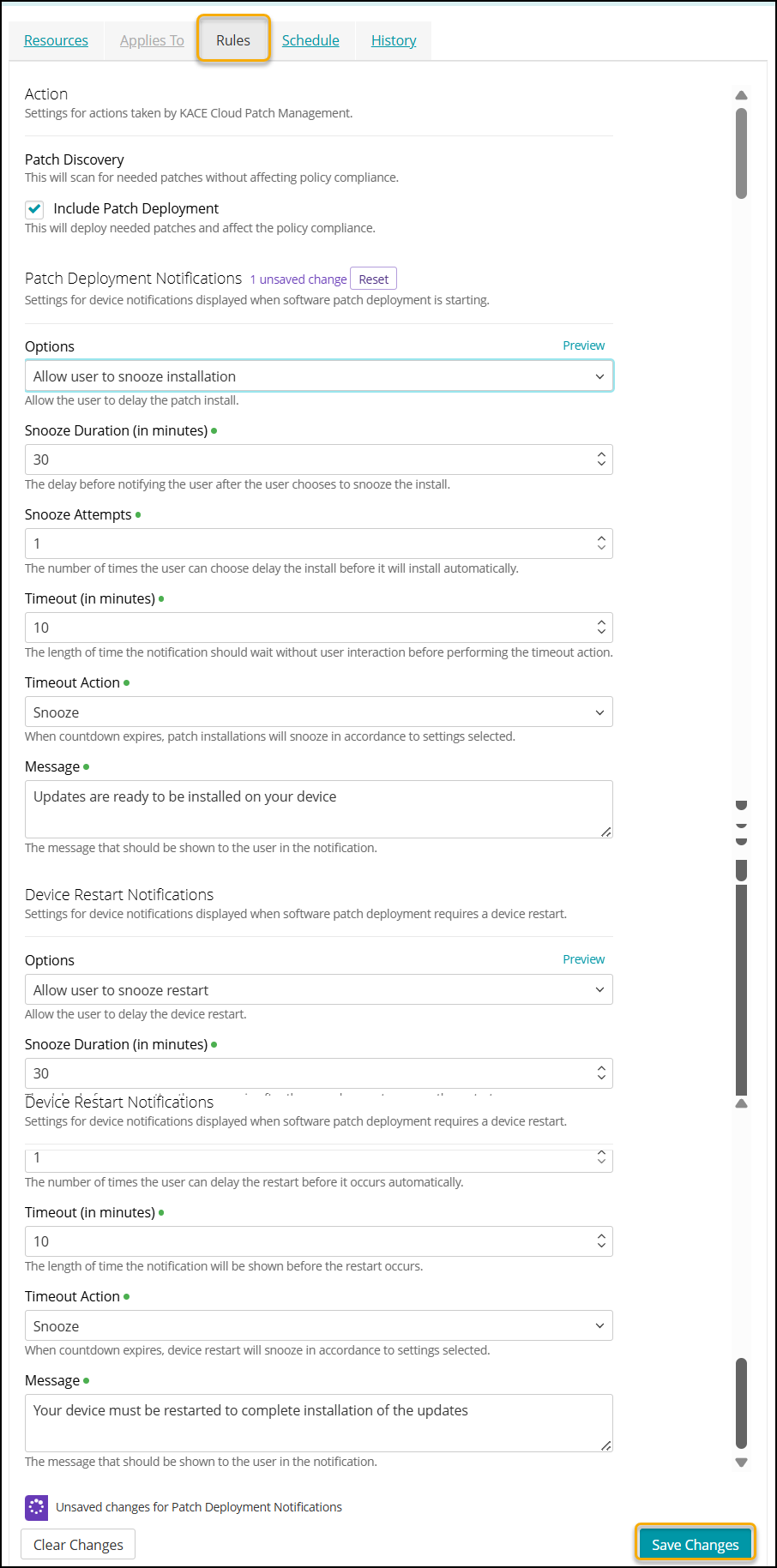
To configure the rules and notifications:
- Go to Policies in top navigation.
- Complete one of the following steps:
- Click Add New.
- Click an individual policy to open it.
- Click the Rules tab.
- Configure the rules for Patch Discovery in Actions section as required.
The Include Patch Deployment checkbox is already selected (default behavior).- Select the Include Patch Deployment checkbox - the patches get deployed after discovery.
- Deselect the Include Patch Deployment checkbox - the patches will not be deployed. This allows you to review the patches before deployment.

NOTE: - When a policy is set to Patch Discovery, Patch Deployment Notifications and Device Restart Notifications options are disabled.
- Policies with Include Patch Deployment rule unchecked will run the patch discovery in the next inventory cycle run and not during the policy run.
- Configure the Patch Deployment Notifications, as required.
- Options:
- Silent install, No notification shown: Disables patching notifications. Patching always occurs during the specified time frame and cannot be interrupted. The process is transparent and end-users are not aware when patching takes place. Selecting this option disables all other settings in the Patch Deployment Notifications section.
- Allow user to snooze installation: Allows end users to suspend the patching process when prompted. Selecting this option enables the following fields. To configure this option, specify the following settings, as required:
- Snooze Duration (in minutes): The number of minutes after which the temporary patching suspension (snooze) ends.
- Snooze Attempts: The number of available snooze attempts.
- Timeout (in minutes): The number of minutes after which patching resumes, if there is no response.
- Timeout Action:
- Install: Patching resumes after the timeout period.
- Snooze: Patching is suspended after the timeout period.
- Message (optional): Any message that you want to display as the notification.
- Preview : Click it to open the Preview dialog. It provides a view of what windows and macOS users see when prompted for installing updates.
- Options:
- Configure the Device Restart Notifications, as required. These are the settings for a device notification that is displayed when a patch deployment needs a device restart.
- Options:
- Supress Restart: Disables the automatic reboot of target devices. Manual restart of the devices is required.
- Allow user to snooze restart: Enables the users to delay the device reboot. Selecting this option enables the following fields. To configure this option, specify the following settings, as required:
- Snooze Duration (in minutes): The duration before prompting the user again after they choose to snooze the restart.
- Snooze Attempts: The number of times users can delay the restart before it occurs automatically.
- Timeout (in minutes): The duration for which the notification is shown before a device restarts.
- Timeout Action: Set the action for a device when countdown expires. Choose the action needed from the following options:
- Snooze: When countdown expires, device restart will snooze.
- Restart: When countdown expires, device will restart.
- Message (optional): Any message that you want to display as the notification.
- Preview: Click it to open the Preview dialog. It provides a view of what users see when prompted for device restart.
- Force restart immediately: Reboots target devices without any notification.
- Options:
- Click Save Changes to apply the changes.